

Web designers use it nearly every day, but not many actually know what the div tag means and where it should be used. This article aims to de-mystify the div tag, explain when and where it should be used and compare it with the similar span tag.
The Short Answer
div—tag...

When talking about SEO, we will think about where to put keywords for SEO, the identification and selection of keywords for SEO standards is paramount. Well, There are some the Most Valuable Places for Keywords on Your Website and in this article will help you understand more about How...
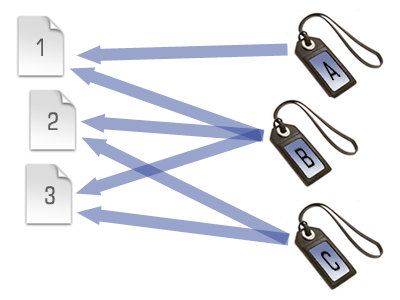
Users use blogs (WordPress, Joomla, Blogger, Dotclear, etc.) are no stranger to Tags, and Category. However, if you are a beginner, Tags and Caterogy are not entirely simple.
Technical understanding of the similarities and differences between the two organizations and mark posts Tags and Category will help you not only...
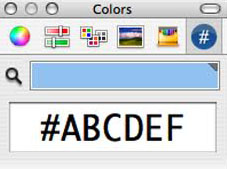
When you code Css you need style for texts, backgrounds,etc you need appy css color code to it. Here's a list hex color codes for using in your web design.
Color Name
Color code
Preview
AliceBlue
#F0F8FF
AntiqueWhite
#FAEBD7
Aqua
#00FFFF
Aquamarine
#7FFFD4
Azure
#F0FFFF
Beige
#F5F5DC
Bisque
#FFE4C4
Black
#000000
BlanchedAlmond
#FFEBCD
Blue
#0000FF
BlueViolet
#8A2BE2
Brown
#A52A2A
BurlyWood
#DEB887
CadetBlue
#5F9EA0
Chartreuse
#7FFF00
Chocolate
#D2691E
Coral
#FF7F50
CornflowerBlue
#6495ED
Cornsilk
#FFF8DC
Crimson
#DC143C
Cyan
#00FFFF
DarkBlue
#00008B
DarkCyan
#008B8B
DarkGoldenRod
#B8860B
DarkGray
#A9A9A9
DarkGrey
#A9A9A9
DarkGreen
#006400
DarkKhaki
#BDB76B
DarkMagenta
#8B008B
DarkOliveGreen
#556B2F
Darkorange
#FF8C00
DarkOrchid
#9932CC
DarkRed
#8B0000
DarkSalmon
#E9967A
DarkSeaGreen
#8FBC8F
DarkSlateBlue
#483D8B
DarkSlateGray
#2F4F4F
DarkSlateGrey
#2F4F4F
DarkTurquoise
#00CED1
DarkViolet
#9400D3
DeepPink
#FF1493
DeepSkyBlue
#00BFFF
DimGray
#696969
DimGrey
#696969
DodgerBlue
#1E90FF
FireBrick
#B22222
FloralWhite
#FFFAF0
ForestGreen
#228B22
Fuchsia
#FF00FF
Gainsboro
#DCDCDC
GhostWhite
#F8F8FF
Gold
#FFD700
GoldenRod
#DAA520
Gray
#808080
Grey
#808080
Green
#008000
GreenYellow
#ADFF2F
HoneyDew
#F0FFF0
HotPink
#FF69B4
IndianRed
#CD5C5C
Indigo
#4B0082
Ivory
#FFFFF0
Khaki
#F0E68C
Lavender
#E6E6FA
LavenderBlush
#FFF0F5
LawnGreen
#7CFC00
LemonChiffon
#FFFACD
LightBlue
#ADD8E6
LightCoral
#F08080
LightCyan
#E0FFFF
LightGoldenRodYellow
#FAFAD2
LightGray
#D3D3D3
LightGrey
#D3D3D3
LightGreen
#90EE90
LightPink
#FFB6C1
LightSalmon
#FFA07A
LightSeaGreen
#20B2AA
LightSkyBlue
#87CEFA
LightSlateGray
#778899
LightSlateGrey
#778899
LightSteelBlue
#B0C4DE
LightYellow
#FFFFE0
Lime
#00FF00
LimeGreen
#32CD32
Linen
#FAF0E6
Magenta
#FF00FF
Maroon
#800000
MediumAquaMarine
#66CDAA
MediumBlue
#0000CD
MediumOrchid
#BA55D3
MediumPurple
#9370D8
MediumSeaGreen
#3CB371
MediumSlateBlue
#7B68EE
MediumSpringGreen
#00FA9A
MediumTurquoise
#48D1CC
MediumVioletRed
#C71585
MidnightBlue
#191970
MintCream
#F5FFFA
MistyRose
#FFE4E1
Moccasin
#FFE4B5
NavajoWhite
#FFDEAD
Navy
#000080
OldLace
#FDF5E6
Olive
#808000
OliveDrab
#6B8E23
Orange
#FFA500
OrangeRed
#FF4500
Orchid
#DA70D6
PaleGoldenRod
#EEE8AA
PaleGreen
#98FB98
PaleTurquoise
#AFEEEE
PaleVioletRed
#D87093
PapayaWhip
#FFEFD5
PeachPuff
#FFDAB9
Peru
#CD853F
Pink
#FFC0CB
Plum
#DDA0DD
PowderBlue
#B0E0E6
Purple
#800080
Red
#FF0000
RosyBrown
#BC8F8F
RoyalBlue
#4169E1
SaddleBrown
#8B4513
Salmon
#FA8072
SandyBrown
#F4A460
SeaGreen
#2E8B57
SeaShell
#FFF5EE
Sienna
#A0522D
Silver
#C0C0C0
SkyBlue
#87CEEB
SlateBlue
#6A5ACD
SlateGray
#708090
SlateGrey
#708090
Snow
#FFFAFA
SpringGreen
#00FF7F
SteelBlue
#4682B4
Tan
#D2B48C
Teal
#008080
Thistle
#D8BFD8
Tomato
#FF6347
Turquoise
#40E0D0
Violet
#EE82EE
Wheat
#F5DEB3
White
#FFFFFF
WhiteSmoke
#F5F5F5
Yellow
#FFFF00
YellowGreen
#9ACD32

Nowadays we all know that blogging has almost become a trend. People from various countries are interlinking with each other, whilst sharing both valuable information and cultural nuances. The subtle use of sharing knowledge to gain traffic and in return making a profit isn't hidden today. But despite the...

Making custom patterns in Photoshop is a very easy process.
If you're like me then having the ability to create your own patterns will make your work stand out and become much more unique and after all that's what our clients are paying us for. Its a quick and simple...

By submitting your websites to various directories will help get a lot of links quickly and easily. Register your website in directories that help websites get indexed sooner on search engines like Google, Bing, Yahoo and more. You will receive visits and traffic as a result. This is an...

All There is to Know about Affiliates Program
We all know that it's remarkably easy to set up your own website especially with the onset of the latest technology and the competition that are offering these services at such ease. All you need is a computer with an Internet connection,...